
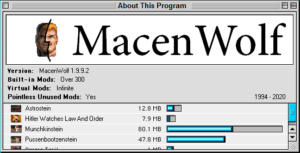
MacenWolf
Authors: serpens, Nexion Initial Release: July 30, 2020 Latest Release: September 5th, 2025 (v1.30)
MacenWolf is a source port for Wolfenstein 3D (Macintosh), built on Wolf4SDL with extensive modifications. Its primary goal is to bring the full catalogue of Macintosh Wolfenstein 3D mods — spanning the 1st, 2nd, and 3rd Encounters — to Windows users, complete with their original quirks and exploits. Alongside this preservation effort, MacenWolf also functions as a modding platform through its S.U.C.K. scripting system.
Background
The project began as a personal obsession of serpens, who spent weeks learning the internals of Mac Wolfenstein, MacOS 7, and the software of that era in order to extract and convert Mac assets and maps into PC-usable formats. Nexion eventually joined and contributed extensive engine work — by the end, arguably more than serpens himself.
The motivation was twofold. First, the Mac Wolfenstein scene had produced around 250 mods, most of which were sitting on dead or dying servers with no way for modern players to access them. Second, existing solutions — including Andy's original port and the ECWolf handling of Mac assets — were found to be inadequate or poorly suited to the goal of faithful Mac recreation. MacenWolf was built to do it properly, from the ground up.
As of the latest release, roughly 400 mod scenarios from the entire Mac modding catalogue have been ported to PC, including landmark works by Laz Rojas and Clubey. The porting effort is expected to continue for several more years.
Engine Features
- Faithful recreation of the Mac Wolfenstein experience, including original bugs and quirks
- Modern control schemes with customizable dedicated strafe buttons
- Custom menus and scenario/episode selection screens styled after the Mac original
- Modern screen resolutions
- Support for 64×64 and 128×128 sprites and textures
- OGG audio support
- S.U.C.K. — a scripting system for changing a wide range of game variables without requiring source code modification
- Openly available source code for further engine customization
Modding Features
MacenWolf supports a broad range of modding capabilities through its GAMEDICT.WL6 configuration file, which can be edited in any text editor. Features include:
- Textured floors and ceilings
- Scrolling colored clouds
- Rain and snow effects
- Parallax sky
- Shading (colormap)
- Gameplay configuration per level
- VSWAP per level
- Enemy variables — speed, behavior, hit points, rotations, and more
- Weapon variables — homing projectiles, knockback, and more
- Player speed, health, and ammo
- Door flushing
- Quartered walls
- Directional sprites (billboards)
- Custom palette support
- Adjustable HUD
- Classic Mac exploits preserved
Tools used for DOS Wolfenstein and Wolf4SDL modding are generally compatible with MacenWolf. The engine also comes with WDC definitions and a modding reference document to help authors get started. While the scripting system does not match the depth of ECWolf's DECORATE, it covers a wide range of gameplay variables at a lower barrier to entry.
Note: Mac mods ported by serpens will only work with MacenWolf. They are not compatible with any other source port.
Running Mods
To run a mod, use the --file command:
macenwolf --file foldername
Place the mod's folder inside your main MacenWolf directory, then run the above command either from a command prompt or via a shortcut or BAT file. For example, to run a mod called "longinus":
- Place the mod's zip file in the MacenWolf folder
- Extract it — you should get a subfolder called longinus
- Run: macenwolf --file longinus
Most mods also include a ready-made BAT file for convenience.
Creating a MacenWolf Mod
Setting up a project in WDC
WDC (available on itch.io) is the recommended map editor for MacenWolf projects. To start a new project:
- Go to File → New Project and give your project a name
- In the Project Information window, fill in the following:
- Base Data Folder — point this to the root directory of your MacenWolf installation
- Compiled Extension — should auto-fill to WL6; set it manually if it doesn't
- Output Folder — choose an empty folder where your compiled game will be placed
- Default Palette — MacenWolf uses a different palette to standard Wolfenstein 3D; point this to the palette file included with MacenWolf
- Map Data File — point this to the WDC definitions file at \definitions\WDC\mac.wdc inside your MacenWolf folder
- In Project Information → Other Options, enable the setting for 128×128 sprites if you are working with high-resolution assets
Configuring GAMEDICT.WL6
The GAMEDICT.WL6 file controls a wide range of engine settings and should be included in every mod. It is well annotated and can be opened in any text editor. Key sections include:
Compatibility Flag
MacenWolf supports both the Second Encounter and Third Encounter engine modes. Toggle between them by commenting or uncommenting the following line:
//3rdenc
Remove the slashes to enable Third Encounter mode. When enabled, the following differences apply:
- Shorter knife distance
- No vacuum spot trick (in 2nd Encounter, standing in a pushed pushwall's former location protects you from enemy attacks)
- Enemies cannot open locked doors
- Knife displays 0 ammo
- Objects do not block projectiles (except cages and column blocks)
- Red frame in the difficulty menu
- 40,000 points required for an extra life (20,000 when disabled)
- BJ's face shows damage at 50% health (25% when disabled)
- Map limits: 400 guards / 64 visible objects (127 guards / 200 objects when disabled)
Episode Names
Up to 12 episodes can be defined. Each needs its own line:
episode1 "EPISODE NAME 1" episode2 "EPISODE NAME 2" episode3 "EPISODE NAME 3"
Episode Starts, Ends, and Secret Levels
Use startepisode* to set which map each episode begins on, and finalmap to define which maps contain elevators that end the game. These are not tied to specific episodes, allowing flexible episode structures.
Example for a three-episode game with five levels per episode:
startepisode1 1 startepisode2 6 startepisode3 11
finalmap 5 finalmap 10 finalmap 15
Secret levels are defined using secretlevel*, where the * is the map containing the secret elevator and the value is the destination map:
secretlevel1 16 — secret elevator on Map 1 sends player to Map 16 secretlevel16 2 — completing Map 16 returns player to Map 2
Custom Graphics
Authors can include custom BMP images to replace default menu graphics:
- episode.bmp* (96×64px) — custom thumbnail for each episode, shown in the episode selection screen
- episodeframe.bmp and episode.bmp — custom layout for the episode/scenario select screen
- difficulty.bmp — custom layout for the difficulty select screen
Place these files in your mod's subfolder and MacenWolf will use them automatically.
Packaging and Releasing a Mod
- Place your project files in a named subfolder inside the MacenWolf directory. Include all edited files: GAMEMAPS.WL6, MAPHEAD.WL6, GAMEDICT.WL6, and any other modified assets such as VSWAP.WL6 or episode graphics
- Create a BAT file containing a single line: macenwolf --file modfoldername Save it as MODNAME.BAT for convenience
- Test the BAT file to confirm the mod loads correctly from within the MacenWolf folder
- Zip and publish — you only need to include the BAT file and the mod's subfolder. Players extract the folder into their MacenWolf directory and run the BAT file to play
Credits
- serpens — project lead, asset conversion, map porting
- Nexion — engine programming
- Andy — Second Encounter code base
- Ripper et al — Wolf4SDL / SDL
- Chris — automap code foundations
- AlumiuN — sound manager
- Adam Biser — WDC editor
- Greg Ewing — WolfEdit editor
- Wayne Campbell and Clubey — guides, tips, and preservation of rare Mac mods
- MCS — SDL Macenstein code
- id Software — Wolfenstein 3D (PC and Mac)