
Radial objects (columns, trees, barrels) — by doomjedi
Step 1 — Give the edges perspective
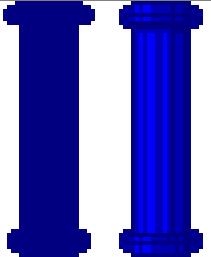
The most important thing is to avoid flat upper and lower edges. Always give them perspective — curved top and bottom edges make cylindrical objects look genuinely round rather than flat.

Starting to Make a Sprite
Step 2 — Block in the shape first
Start with just one or two colors to establish the general shape and body of the object. Only once the overall form is right should you begin adding colors and shading details..
Shading and Texturing Basics
Step 3 — Match your shading style to the material
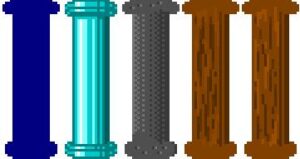
Different materials call for different shading techniques:
- Vertical shading — best for smooth or shiny surfaces, primarily glass and metal. Include a white "shine" stripe to sell the reflectivity.
- Irregular checkerboard-type shading — best for rocks and very rough, uneven surfaces.
- "Ripped" vertical or horizontal lines — best for wooden surfaces.
Step 4 — Perspective in grass, moss, icicles, and similar details
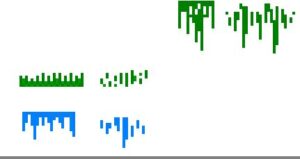
Most mods use a flat approach for moss and similar surface details, but using perspective makes them look more three-dimensional and more natural — especially when sprites auto-rotate.
A few rules to keep it looking right:
- Don't shift the perspective effect too high from the bottom edge, or too low from the top edge. Perspective looks convincing up to about 3–4 pixels from the edge.
- Make the center parts longer and the side parts shorter to reinforce the sense of curvature.
To return to the GFX tutorials, click here.