
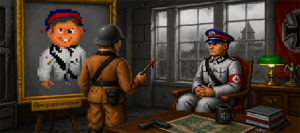
Welcome to the GFX Editing section of the Front- the place where your Wolfenstein 3D project starts to take on a life of its own. Whether you're here to tweak a few textures, replace sprites, or build a full-blown Total Conversion, this is where the visual identity of your add-on is forged. There’s no polite way to say it: graphics can make or break your Wolfenstein 3D project. You can have clever level design and solid gameplay, but if your visuals feel off, the whole experience collapses. The good news? You don’t need cutting-edge tools or years of experience to get it right-just a solid understanding of the constraints and a bit of creative discipline.
This section is here to help you do exactly that.
Whether you’re tweaking a few textures or diving headfirst into a full Total Conversion, graphics editing is where your project truly starts to feel like yours. Moving away from the original Wolfenstein assets not only gives your project identity, it also helps you avoid the all-too-familiar “I’ve seen this before” effect-and, not unimportant, potential copyright headaches.
You’ll find two paths here.
On one hand, there’s a growing collection of ready-made assets you’re free to use or modify (just give proper credit where it’s due). On the other, there are practical tips to help you create your own textures and sprites from scratch. Most people end up doing a bit of both. But before you go wild in Adobe Photoshop or Paint Shop Pro, it’s important to understand the world you’re working in.
Wolfenstein 3D isn’t modern. Not even close.
It’s a product of early 90s technology-raw, limited, and surprisingly unforgiving.
You’re working with:
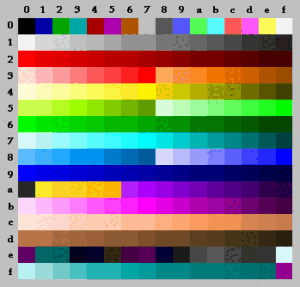
- 64×64 pixel textures for walls and sprites
- 256-color palette with strict limitations
- A rendering engine that doesn’t care about your beautiful high-res source image
That means detail gets crushed, colors shift unpredictably, and complex designs often turn into visual noise. The trick isn’t fighting these limitations-it’s designing with them in mind. Simplicity beats complexity. Strong contrast beats subtle gradients. Clarity always wins.
To actually get your graphics into the game, you’ll also need tools like ChaosEdit, WDC, or FloEdit. These bridge the gap between your image files and the game engine itself. Just don’t expect hand-holding-like most classic tools, they reward experimentation and a willingness to read documentation.
And that’s really what these pages are about. Not a step-by-step manual. Not a one-click solution. But a foundation.
Because despite all its technical limitations, Wolfenstein 3D remains one of the most iconic games ever made. Its charm lies in working with those constraints, not spite them. Like a classic car, it may lack modern features-but that’s exactly why people still care.
So embrace the limits. Experiment. Break things. Try again. And most of all-have fun building something that feels like it could have shipped in 1992, but couldn’t have been made by anyone else but you.